Previous topicNext topic

MMV unhappy with preview on another monitor on launch/close

Questions, comments, feedback, etc.
Post Reply
Valis
Posts: 30
Joined: Thu Feb 11, 2021 6:37 am

MMV unhappy with preview on another monitor on launch/close

Post by Valis »

Microsoft Windows 11 Pro (Version 10.0.26100 Build 26100), AMD Ryzen 9 5950X, 64 GB (RAM), NVIDIA RTX 3090 using 4 outputs. Center monitor (main but not first) is 32" 4K, then the others are 1080p of various sizes spread around it.
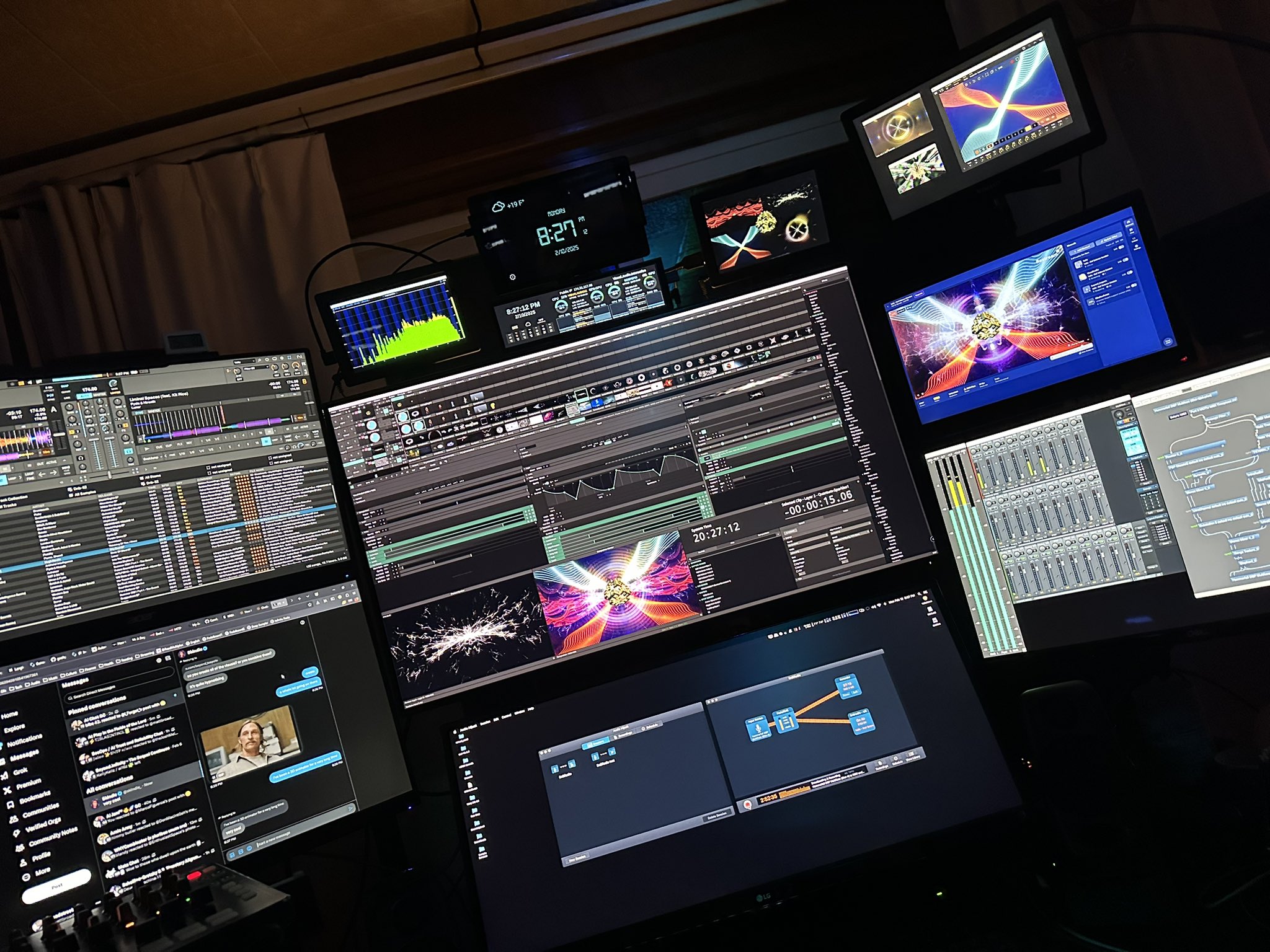
Monitors.jpg
Monitors.jpg (526.89 KiB) Viewed 1358 times
Current MMV position would be behind Resolume in center on 32", and the preview is the top right corner monitor, top left window onscreen (Gold radial stuff). Below that is another app's preview, and Imaginando's VS is to the right. For some reason, since I moved and repositioned my monitors this workflow results in Magic crashing on exit, no matter what I do. I've done a thorough clean & reinstall of the app, and this happens without a project loaded. It will also 'freeze' the video window on launch. Meaning, if I just leave the preview where it is as I used to, it does not initialize the video window for output and I cannot see the stats (fps etc) on launch as I should be able to, as it is enabled.

The solution is simple, move the preview window onto the same monitor MMV is present on, before exiting so on launch the video window initializes. If I forget, when I move it back and try to exit, the app freezes and it can take 1-2 attempts to get it to 'remember' that the preview was on the main monitor so I achieve a successful launch, and then move the preview window (once working) back to that small monitor.

I didn't use to have to do this, and it's not a change with the version of Magic I don't think as this build isn't recent?
Magic
Site Admin
Posts: 3676
Joined: Wed Apr 09, 2014 9:28 pm

Re: MMV unhappy with preview on another monitor on launch/close

Post by Magic »

To me, that sounds like an issue with the graphics driver. I wonder if it’s some kind of conflict between the AMD and the Nvidia. Is there a way you can temporarily disable the AMD to see if it fixes anything?
Valis
Posts: 30
Joined: Thu Feb 11, 2021 6:37 am

Re: MMV unhappy with preview on another monitor on launch/close

Post by Valis »

5950X has no integrated GPU. Win11 has some prioritization features but they're set for MMV and the other apps I'm using.

Issue has persisted for a year with Nvidia drivers, and I rotate between studio drivers & gaming depending on workload.
Magic
Site Admin
Posts: 3676
Joined: Wed Apr 09, 2014 9:28 pm

Re: MMV unhappy with preview on another monitor on launch/close

Post by Magic »

Have you tried upgrading or downgrading the NVidia drivers?
Valis
Posts: 30
Joined: Thu Feb 11, 2021 6:37 am

Re: MMV unhappy with preview on another monitor on launch/close

Post by Valis »

Yes, rolled back to a driver branch from last year (I keep them on my RAID), and have gone through a few current versions as well. There's no crash log when this occurs, and it's noticeable on launch because I have render stats (FPS etc) displayed at the bottom of the preview window and it will be black on launch *only when it launches on the second monitor*. I also tried swapping inputs around for the monitors using HDMI outputs, and it made no difference.

I use Wagnarsoft's DDU to fully clean drivers in safe mode when having issues, block Windows download of their DCH branch and install directly from Nvidia's site.

I haven't observed similar issues with any other application, and I use all of the Autodesk Entertainment suite apps, all of the Adobe CC apps including the Substance suite, many different VJ apps, and some AI stuff as well (thanks to my 24GB VRAM on the RTX 3090).
Sadler
Posts: 1348
Joined: Sat Aug 02, 2014 7:10 pm
Location: London, UK

Re: MMV unhappy with preview on another monitor on launch/close

Post by Sadler »

Some users with multi-monitor problems have used the Nvidia driver option Multi-Display/Mixed GPU Acceleration set to Compatibility performance mode. Nvidia removed this option in later drivers but you could roll-back to find it or download Nvidia Inspector by Orbmu2k, where the option still exists.
Valis
Posts: 30
Joined: Thu Feb 11, 2021 6:37 am

Re: MMV unhappy with preview on another monitor on launch/close

Post by Valis »

Rearranged monitors, cleaned drivers & moved to the Studio Driver branch (RTX 3090). Still the same.

Reset the new Nvidia app's settings, turned off (and then back on) the feature that allows it to automatically configure applications for you. That seemed to do it, probably DDU doesn't clean that app's own method of changing flags and something needed to be cleared out. Back to normal!
Post Reply