Page 1 of 1
Jpeg folder
Posted: Tue Apr 26, 2016 4:21 pm
by honigtiger
Hello there
I am pretty new to MMV and have searched the forum and manual but still have no clue, excuse me for that

Here's my challenge:
I have a folder of jpegs that I can add to a scene via the respective module. I have also found out how to change the time after that a new image appears (with the FPS setting). But I would like those images to smoothly fade from one to another. Is there a way to achieve this with the "jpeg folder" module or do I have to make a scene for each image and then steer the transition via the playlist?
Cheers, Martin
PS: Thank you for this incedible piece of software, I'm already addicted!
Re: Jpeg folder
Posted: Tue Apr 26, 2016 5:07 pm
by Magic
Hey Martin, I'm glad you're enjoying it.
To be honest it never occurred to me to add a fade option for the JpegFolder module. I intended the JpegFolder module to be used more as a video player and less as a slideshow. But in retrospect, your suggestion seems like an obvious good idea

. I will make sure to put it on my list.
For now, you might want to take a look at the MultiMix module, which fades automatically from one input to the next. All you have to do is hook up a few Image modules as inputs. Hopefully you don't have too many images
.
Re: Jpeg folder
Posted: Wed Apr 27, 2016 4:32 pm
by honigtiger
Hi Eric
Thanks for the quick reply. OMG this is exactly what I was looking for...

I have to admit that I found out by chance that I have to use this "Increase" parameter (what are all these other thingies like Average, Clamp, Delay etc for, geez
) but it's working like a charm...
Will post soon what I'm working on btw!
Cheers,
Martin
Re: Jpeg folder
Posted: Wed Jan 28, 2026 11:38 am
by thedoger82
Hi there, im having troubles with some pictures, (btw im using mac) and when i preview the pictures in finder they look fine, but when i play the folder, some of the pictures are turned to the left 90 degrees, my question is, is this a problem in magic, and how to fix it? TIA
Re: Jpeg folder
Posted: Wed Jan 28, 2026 12:26 pm
by thedoger82
I found this:
This problem occurs because macOS Finder and Preview respect the photo's EXIF orientation metadata (a "flag" that says "turn me 90 degrees"), while other software (like some web browsers, older image editors, or basic viewers) ignores this tag and displays the raw, rotated pixel data.
Can magic be updated to read EXIF metadata?
Thanks!
Re: Jpeg folder
Posted: Wed Jan 28, 2026 4:25 pm
by Magic
Possibly. The JpegFolder module uses a very specific hardware-accelerated method to load the files. We'll look to see if it can read the metadata.
Re: Jpeg folder
Posted: Fri Jan 30, 2026 12:34 pm
by thedoger82
For now, my solution is, (this is for mac only) open the picture with "preview" (PDF software from mac), and then go to "File" then "Export" use the same name and location and replace
Re: Jpeg folder
Posted: Thu Feb 05, 2026 8:09 pm
by Sadler
honigtiger wrote: ↑Tue Apr 26, 2016 4:21 pm
I would like those images to smoothly fade from one to another. Is there a way to achieve this with the "jpeg folder"
I came up with a reliable solution for this a while ago but never got around to posting. You'll need one global, two JpegFolders and a Mix node. The global is simply a sine oscillator used by the other nodes to synchronise. In this screenshot it is called 'loop' and its value controls the speed of the crossfade. The JpegFolders point at the same JPG folder and the index is controlled from the global tested at the extremes of the oscillator [if(x<0.02,1,0) for the first and if(x>0.98,1,0) for the second] and the trigger increments the image index. It is solid when the crossfade is slow or fast.
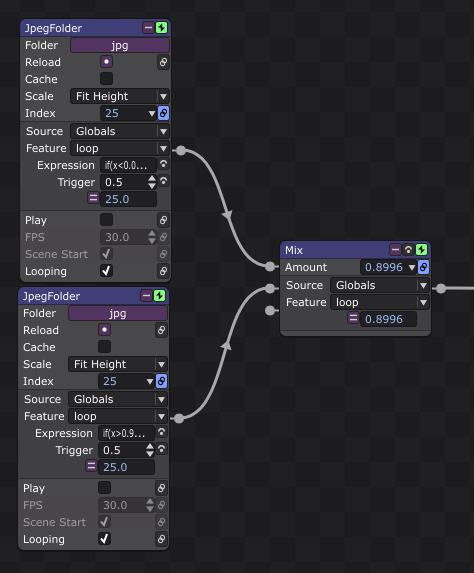
- Screenshot 2026-02-05 193923.png (64.42 KiB) Viewed 19089 times
Re: Jpeg folder
Posted: Sat Feb 07, 2026 12:44 am
by Magic
Very clever, thanks! We’re always surprised and pleased by the things you guys come up with.
Re: Jpeg folder
Posted: Fri Apr 03, 2026 11:09 pm
by glitchpudding
I use the VVMotionBlur to smooth out slideshow transitions. It's pretty effective.