Page 1 of 1
Worse performance after update to 1.65
Posted: Sat Apr 23, 2016 10:01 pm
by lovethatsoup
Hi!
I purchased Magic at 1.53 and had never upgraded til this week..
It ran very smoothly with few to no hitches..
However, after upgrading to 1.65 I noticed my laptop would get really hot and the screen would flicker, for example when using the radial blur module...
This never happened with 1.53..
I am running windows 8 on an ASUS F550L
I tested the same projects on both versions, so the problem is definitely with 1.65, any thoughts? Thanks in advance!
Re: Worse performance after update to 1.65
Posted: Sat Apr 23, 2016 10:19 pm
by Magic
Hmm, the only thing I can think of is that maybe your project is defaulting to a higher resolution in 1.65, which would cause it to go slower. If you enable Window > Magic Window Options > Status Information, what does it say about the resolution in 1.65 vs. 1.53?
Re: Worse performance after update to 1.65
Posted: Sat Apr 23, 2016 10:35 pm
by lovethatsoup
Eric wrote:Hmm, the only thing I can think of is that maybe your project is defaulting to a higher resolution in 1.65, which would cause it to go slower. If you enable Window > Magic Window Options > Status Information, what does it say about the resolution in 1.65 vs. 1.53?
THX for your speedy response! They are both the same! 1280 * 720
Re: Worse performance after update to 1.65
Posted: Sat Apr 23, 2016 10:42 pm
by Magic
Ok thanks, that's not it then

.
So when you say the performance is worse in 1.65, does the status information actually show that the frames per second is lower?
Re: Worse performance after update to 1.65
Posted: Sat Apr 23, 2016 10:52 pm
by lovethatsoup
Eric wrote:Ok thanks, that's not it then
.
So when you say the performance is worse in 1.65, does the status information actually show that the frames per second is lower?
OKKK We (You) have found it......
The frame rate is considerably higher in 1.65 basically...hovering around 47, whereas in 1.53 hovers around 33 (in fullscreen mode respectively)
Re: Worse performance after update to 1.65
Posted: Sat Apr 23, 2016 10:53 pm
by lovethatsoup
So in that case the performance is not worse......
Re: Worse performance after update to 1.65
Posted: Sat Apr 23, 2016 11:03 pm
by Magic
Yeah, 1.65 is actually the best-performing Magic version yet, so initially I was surprised about your post
. But it's nice to hear that you got such an increase in the frames per second.
Here's what I think happened: In version 1.62, I added better support for auto-selection of Nvidia graphics versus the integrated Intel graphics. So when your laptop is getting hot, it's because the better Nvidia graphics are being used. Hotter is actually a good thing
.
If you want though, you can always turn off the Nvidia graphics in the control panel.
Or if you want to use the Nvidia graphics but you want to get rid of the flickering, you might want to try just updating the Nvidia driver.
Re: Worse performance after update to 1.65
Posted: Sat Apr 23, 2016 11:13 pm
by lovethatsoup
Okk now that makes sense.....I am coming from the audio world so a bit unschooled in these matters.....how would I go about updating the driver(s) ?
and via control I can access NVIDIA but there seems not to be a way to disable from there...
Thanks so much for your swift responses and help
Re: Worse performance after update to 1.65
Posted: Sun Apr 24, 2016 12:13 am
by Magic
The driver download is at
http://www.nvidia.com/Download/index.aspx.
The graphics processor selection is in the Nvidia Control Panel under "Manage 3D Settings":
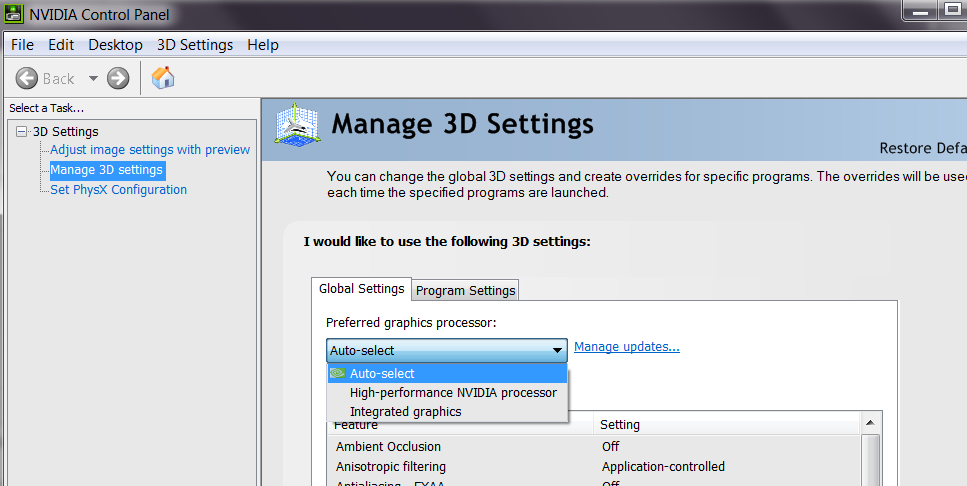
- GraphicsProcessor.png (56.64 KiB) Viewed 16828 times
You can either set it for all programs ("Global Settings") or for each program individually ("Program Settings").
Re: Worse performance after update to 1.65
Posted: Sun Apr 24, 2016 12:23 am
by lovethatsoup
Great! I was looking there but couldn't quite find it...thanks so much!
Btw.....suggestion, it would be great to be able to record parameter automation....
I think this has been suggested already though....
Re: Worse performance after update to 1.65
Posted: Sun Apr 24, 2016 6:11 pm
by Magic
Yup that is on my list of things to add.