I think what you are really asking for is some kind of brightness/contrast adjustment, but on a per-channel basis. It could be done on either the RGB channels, or the HSV channels.
The mathematical operation would be a simple linear calculation of the style
y = ax + b, where
x is the input color channel (r/g/b/h/s/v),
a is the contrast (>1 would be more contrast, <1 would be less),
b is the brightness (which can be positive or negative), and
y is the output color channel.
The ColorRGB module accomplishes the contrast aspect as I suggested in my earlier post, although it only lets you scale by less than 1 (not greater than), but I don't think you need that anyway.
For the brightness aspect, there is an ISF effect called "Channel Slide".
So you just have to connect the modules as follows:
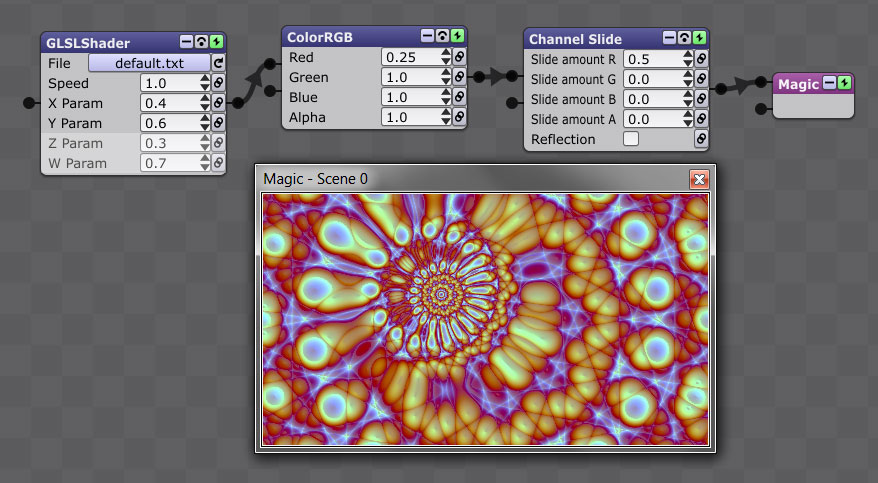
Your shader module -> ColorRGB -> Channel Slide
Here's an example:
- CompressedShiftedRed.jpg (102.72 KiB) Viewed 11725 times
I "compressed" the Red channel by .25 so it goes from 0 to .25, and then I "slid" it by .5 so it goes from .5 to .75.
If you want to do it in HSV space instead of RGB, just do:
Your shader module -> RGBtoHSV -> ColorRGB -> Channel Slide -> HSVtoRGB
In this case, the RGB processing (in ColorRGB and Channel Slide) would actually be in HSV.
These methods are the only ways to accomplish what you're asking, because Magic has no control over what colors go into the shaders (with the exception of any input they require). The only improvement would be to combine some of the RGB/HSV effects into one effect, which would be a slight speed advantage.
Does that all make sense? It hope it wasn't too technical

.