Page 1 of 1
Transferring a Trail
Posted: Sun Jan 04, 2026 8:39 pm
by The Urban Hermit
Is it possible to transfer an existing trail between scenes? I am using a few objects that are moving and generating trails. They are in once scene and that is used as an input to other scenes. This is to give the impression of the objects moving and generating the trails in front of different back grounds. When a new scene starts the objects are in the correct position, from the previous scene, but the trails have disappeared. I have checked that Ignore Restart is ticked everywhere. I suspect the data for the trails is not being retained when the new scene is started. Can anyone explain what is happening or if there is a work around.
Re: Transferring a Trail
Posted: Mon Jan 05, 2026 8:21 am
by Sadler
If I include a scene with trails in another scene, I can see the trails. I can add effects to the trails in the second scene. Perhaps there's some effect that is resetting the output?
Re: Transferring a Trail
Posted: Mon Jan 05, 2026 5:28 pm
by The Urban Hermit
Hi Sadler, Happy New Year and thanks for the reply. I do see the trail, the issue is when I switch to a new screen the trail get redrawn from the start I would like the trails to be continuous and only the background to changes. I did try to attach a short video showing an example of what I am seeing but the forum doesn't let me, I've put it on my Google drive.
https://drive.google.com/file/d/15uvRws ... sp=sharing
A work around would be to switch the backgrounds in a scene. But that would have to be done at specific times and the only way I can see of doing anything at specific times is via the playlist.
Re: Transferring a Trail
Posted: Mon Jan 05, 2026 8:15 pm
by Sadler
There is no way to keep trails from different scenes with different backgrounds. Even if the movement didn't restart, the trails would be covered by the new background.
However, this setup might get you closer to what you want:
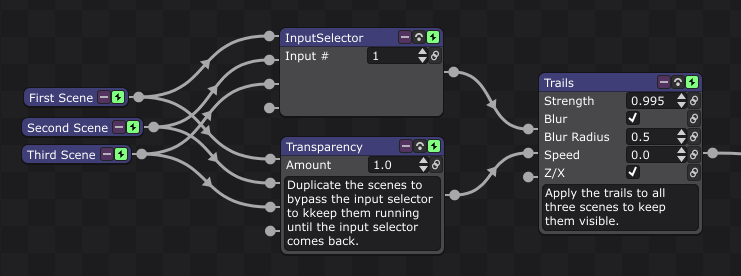
- Screenshot 2026-01-05 190624.png (64.45 KiB) Viewed 15497 times
Note that an Increase modifier can be your timer in a scene where each unit counted is one second. Note 2: Move the Trails (x3) to before the InputSelector if you want the trails for each object independently. Note 3: In either case layer your backgrounds under this setup and sync the BGs with their respective objects using a global.
Re: Transferring a Trail
Posted: Mon Jan 05, 2026 11:43 pm
by The Urban Hermit
Thanks for the feedback. I think using the InputSelector and Playback Time should give me what I want. I will experiment over the next day or two.
Re: Transferring a Trail
Posted: Fri Jan 09, 2026 2:09 pm
by The Urban Hermit
The best solution I have found is to use Transparency controlled by Playback Time. The Expression function controls the time the scene is to be selected and the Smooth function allows for a fade between scenes.