Page 1 of 2
UI suggestions
Posted: Sun Nov 16, 2014 9:43 pm
by blackdot
hello, i thought we could gather suggestion on user interface improvements here, ways to make the workflow more efficient and intuitive. Including shortcuts.
- middle mouse button for panning (already said that in another thread, i know

)
- add shortcuts to the context menu like other softwares do that:

- magic.png (9.11 KiB) Viewed 47724 times
here with beautifully painted lines under the letters to show which key would be the shortcut.
- maybe 'space' for opening the context menu?
- have the "snapping" of noodles done in a bigger area, so it's easier to drop them on another node
- connect multiple nodes to another node by shift-dragging the noddle, which results in draging noodles out of all selected nodes.
- shortcut for connecting two selected nodes. press shortcut again for inverted connection (by default magic could connect the OUT of the node which is more left, to the IN of the node which is more right, because current layout is from left to right). if it goes from left to right, you could even do more than two nodes.
- eg ctrl-click on node for auto-connecting its OUT to the magic-node (alternatively add this option to the context menu of a node)
- ability to drop-insert a node on the existing connection of two other nodes. hover with the node above the connction, the connection gets highlighted, drop it and it's inserted inbewteen the two nodes.
- and vice versa: rip out a middle-node (leftnode---middlenode---rightnode) without disrupting the noodle. drag a node with alt-click away, and its connections get deleted, but left-node is still connected to rightnode.
I have to admit, almost everything above, i "stole" from blender, so my suggestions might be biased. they do strike me as useful though
.
\\edit: some keywords (had troule finding this topic again): user interface, gui, experience.
Re: UI suggestions
Posted: Sun Nov 16, 2014 10:40 pm
by Terry Payman
Extra-fine adjustment of numeric module parameters when dragging etc.
The present /10 sensitivity achieved by holding down Ctrl(Cmd) is very useful, but sometimes is still far too coarse. Keyboard input is then required, and adjustment and optimisation becomes very much slower.
Add a /100 option when additionally holding down Shift.
I think I saw a prior request for finer control, but failed to find it with a forum search for "parameter".
Re: UI suggestions
Posted: Mon Nov 17, 2014 12:27 am
by Magic
Ok, good ideas. Thanks!
Re: UI suggestions
Posted: Mon Nov 17, 2014 10:01 am
by damstraversaz
another little one about UI :
About adjusting the gain , it could be very useful to have the gain windows directly on the audio midi windows. with live musicians, you need to tweak them a lot, and using the menu it is not very convenient. you loose too the visual cue of the fader One great option in my opinion will be the possibility to have a midi learn fonction on this fader, so you can easily tweak them on stage.
and thanks for all the previous update, Magic is really become a reference for digital art !
Re: UI suggestions
Posted: Mon Nov 17, 2014 5:59 pm
by Magic
About adjusting the gain , it could be very useful to have the gain windows directly on the audio midi windows. with live musicians, you need to tweak them a lot, and using the menu it is not very convenient. you loose too the visual cue of the fader One great option in my opinion will be the possibility to have a midi learn fonction on this fader, so you can easily tweak them on stage.
Ok that sounds good. There's probably enough room to have the gain sliders in the Audio/MIDI window instead of in a separate popup.
and thanks for all the previous update, Magic is really become a reference for digital art !
Thanks! More cool features are coming!
Re: UI suggestions
Posted: Thu Nov 20, 2014 3:59 pm
by Terry Payman
Eric wrote: There's probably enough room to have the gain sliders in the Audio/MIDI window
Please may we have the option to reduce as well as boost gain?
-12dB to + 24dB adjustment maybe.
Re: UI suggestions
Posted: Thu Nov 20, 2014 10:24 pm
by Magic
Sure, no problem.
One thing to be aware of though (which you may already know): once the signal has clipped, you can't un-clip it. Reducing the gain would therefore give you a quieter but already-distorted signal.
Re: UI suggestions
Posted: Tue Nov 25, 2014 9:03 am
by Terry Payman
Eric wrote:Sure, no problem.
Thanks Eric!

Eric wrote:...once the signal has clipped, you can't un-clip it. Reducing the gain would therefore give you a quieter but already-distorted signal.
With respect, I think it is more likely that clipping would occur
within Magic because the gain has been
increased. Pre-recorded music is usually normalised to peak just below clipping level, so when the source is a music player inside the host PC it's likely the signal will be clipped if level raised further (especially with +24dB gain available).
I posted some related further thoughts here:
http://magicmusicvisuals.com/forums/vie ... p=824#p824
Re: UI suggestions
Posted: Tue Nov 25, 2014 11:41 am
by damstraversaz
one other suggestion, ( maybe I miss this of course) :
the possibility to have the midi learn fonction for the prev et next entry button , that's will be very useful on stage. Btw , 1.5.2 is really a great update, congatulations !
Re: UI suggestions
Posted: Tue Nov 25, 2014 3:56 pm
by Magic
With respect, I think it is more likely that clipping would occur within Magic because the gain has been increased. Pre-recorded music is usually normalised to peak just below clipping level, so when the source is a music player inside the host PC it's likely the signal will be clipped if level raised further (especially with +24dB gain available).
Yep, I was specifically referring to live input. That's what I originally intended the audio gain to be used for. But I can see now that it would be useful to lower the gain for file playback as described in
http://magicmusicvisuals.com/forums/vie ... ?f=4&t=236.
one other suggestion, ( maybe I miss this of course) :
the possibility to have the midi learn fonction for the prev et next entry button , that's will be very useful on stage. Btw , 1.5.2 is really a great update, congatulations !
Thanks
. I know that more MIDI control is something everyone wants and I'm making it a priority.
Re: UI suggestions
Posted: Thu May 14, 2015 2:46 pm
by blackdot
-hey, i noticed that we can press spacebar to maximize/minimize modules. would be great, if we could select multiple modules and then also press space for this. this does work, when the modules are selected with ctrl-click, but not when dragging a selectiono area over them.
-also as space is also used as "enter" on selected buttons or icons, it quickly gets confusing when i press space to maximize a module, mouseclick on the bypass to bypass it, then want to press space to minimize it again, but instead it unbypasses it.
-also to be able to opt in that bypass/power param's are always shown in modules.
Re: UI suggestions
Posted: Thu May 14, 2015 4:07 pm
by Magic
hey, i noticed that we can press spacebar to maximize/minimize modules. would be great, if we could select multiple modules and then also press space for this. this does work, when the modules are selected with ctrl-click, but not when dragging a selectiono area over them.
Actually what's happening is that when you click on a module, the minimize button is the first button, so it gets focused by default. Pressing the Tab key will then go through all the buttons/boxes in order, focusing each one. Pressing the Space bar will toggle whatever button/box is currently focused.
The shortcut for toggling minimize on any selected modules is Ctrl/Cmd-M.
also to be able to opt in that bypass/power param's are always shown in modules.
Sure, that's a good idea.
Re: UI suggestions
Posted: Thu May 14, 2015 4:17 pm
by blackdot
aah, alright, so i'm wrong trying to use space anyway. okay thanks
.
- also faster scroll speed, vertical and horizontal, with the mousewheel, i mean.
- zooming out.
Re: UI suggestions
Posted: Sun May 24, 2015 3:26 pm
by blackdot
- add "replace with>paste" to the context menu. like the rmb>insert paste on an existing connection.
Re: UI suggestions
Posted: Wed May 27, 2015 5:31 pm
by Magic
Ok sounds good. Zooming out will have to wait for Magic 2.0 though, as it will require a major UI redesign.
Re: UI suggestions
Posted: Thu Jul 02, 2015 10:06 pm
by Kvasnik
UI related ideas:
To be able to change the color of scene tabs. I was also wondering whether having different colors for modules would be useful, but it could get distracting.
Another idea would be to have the scene tabs (optionally) running vertically down the left side of the screen.
Re: UI suggestions
Posted: Thu Jul 02, 2015 11:44 pm
by Magic
Another idea would be to have the scene tabs (optionally) running vertically down the left side of the screen.
I actually had that as an option in the original Magic prototype, but a lot of the testers didn't like reading the text sideways, so I just took it out. Ended up being easier for me anyway
.
To be able to change the color of scene tabs. I was also wondering whether having different colors for modules would be useful, but it could get distracting.
Yeah some other people have suggested that. I've wanted to keep the interface clean and not worry about coming up with an algorithm to determine the selection color based on the background color. But I have it on my list of things to look into later.
Re: UI suggestions
Posted: Fri Jul 10, 2015 5:56 am
by blackdot
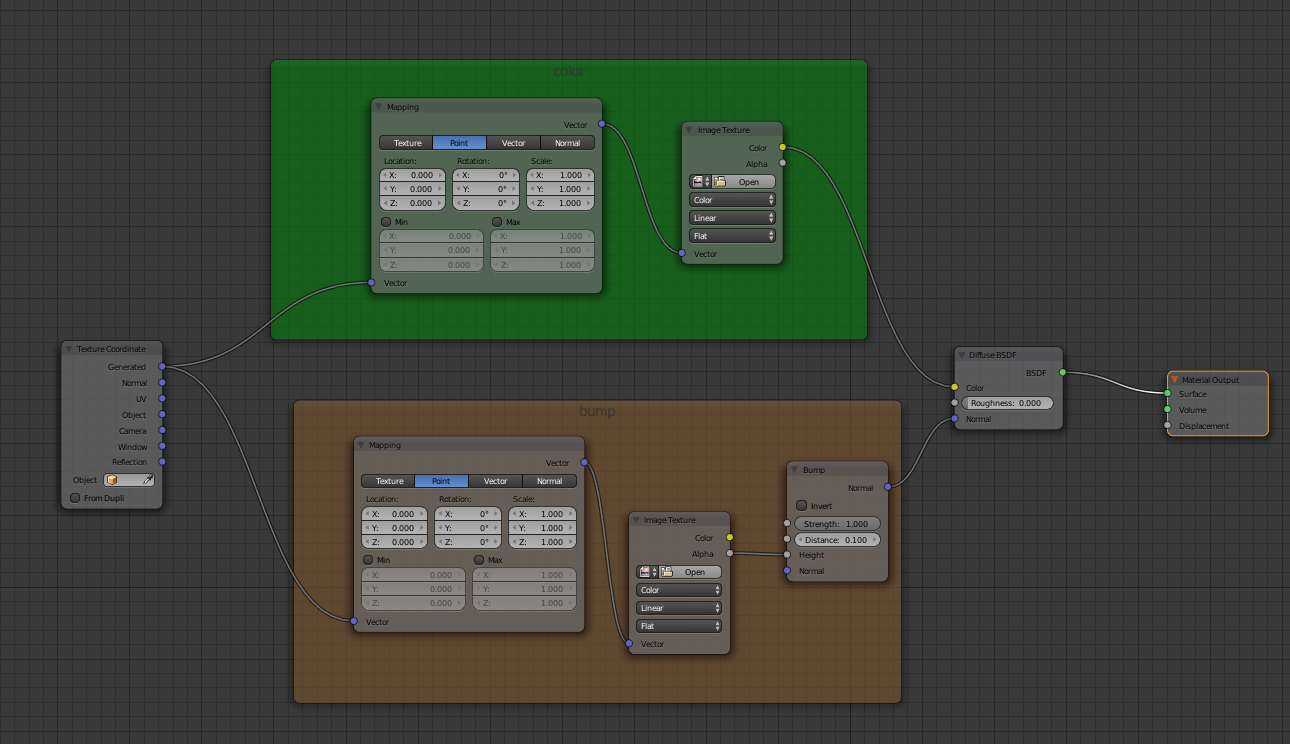
-ability to organize the noodling with colors or frames. an example from blender nodes:
- upload-magic.png (135.1 KiB) Viewed 46401 times
-display the amount of available vram like this: 1'970'680 or 1,970,680 instad of : 1970680. for better readability.
Re: UI suggestions
Posted: Fri Jul 10, 2015 4:09 pm
by Magic
ability to organize the noodling with colors or frames. an example from blender nodes
A couple people have suggested being able to choose colors for the modules (instead of just the default blue). I'll start thinking about how to do this in a way that wouldn't be too messy.
display the amount of available vram like this: 1'970'680 or 1,970,680 instad of : 1970680. for better readability.
Ok that's easy. At some point I may also change it to MB instead of KB since KB is not too significant any more.
Re: UI suggestions
Posted: Thu Jul 16, 2015 12:41 am
by Kvasnik
Eric wrote:Another idea would be to have the scene tabs (optionally) running vertically down the left side of the screen.
I actually had that as an option in the original Magic prototype, but a lot of the testers didn't like reading the text sideways, so I just took it out. Ended up being easier for me anyway
.
Actually I imagined the tabs arranged vertically but still with the text horizontal, so it would look like a list.