would be cool to have some kinda beat detection or even the possibility to manually tap a certain tempo which magic than catches. this could then be used as a usual 0-1 thingy to manipulate other things. eg. it could be the "speed" for videos and so on.
thinking about it, i better give an example: assuming i have a little animation loop, let's say a walking stick figure, which i want to synchronize with the live music (every step on every beat). detecting low frequencies is not really useful, as it can only be used to set the start of the animation (it could influence the speed, the video gets slow and fast then, and that's not what i would want). manually adjusting the speed parameter kinda works, but well.. only kinda. after a few beats it's off again (also if i get lucky and find a perfect value, i have no option to "offset" the video loop). tapping to the beat (or auto detecting) and somehow converting this info in to the velocity of a video would be awesome. or well.. implementing meshes and bones altogether, however that seems a little far fetched at the moment.
maybe there could also be a semi automatic bpm detection. maybe magic could "listen" to the low frequencies, the bass, for a short while and convert this info into BPM.
i'm thinking only of the use for movie clips, however the possibilities would be big, i assume. the big advantage over just detecting low frequencies, would be, that a recurring 0-1 tick would make things smoother and less sudden, because the "next beat" would become anticipatable.
i guess for converting a BPM value into play-speed of videos we'd need some kinda standart like 4 taps/beats equal 2 seconds of clip or something. that means if i tap 4 times while looping my 2 seconds clip (in which a stick figure takes one second for one step and another second for the other step), the steps of the figure would match the first and third tap
BPM clock - automatic or manual (or resync clips to bpm)
Re: BPM clock - automatic or manual
Thanks, yeah I think we are planning to have some kind of beat detection feature. I know it's something that would be useful for a lot of people.
Beat detection is tricky though, because it has the potential to do undesirable things. If I remember correctly, that's why we didn't put in in the software originally. It's not an exact science, and it could be bad if it detected something incorrectly during a live performance. Even if you manually tapped in a tempo, the tempo might change and things would go out of sync. Always hard to deal with these kinds of things during live performances.
One thing that might be helpful to know is that the Ramp modifier cycles exactly once per second when the value is 1 (= 60bpm), twice per second when the value is 2 (= 120bpm), and so on. So you could use it as an exact timing mechanism if you set the parameter source to "(No source)". I think this info is actually not in the User's Guide so maybe I should add it.
Even more helpful than that is you can do a little bit of magic (no pun intended) with modifiers to set an exact tempo. If you set up the modifiers like this:
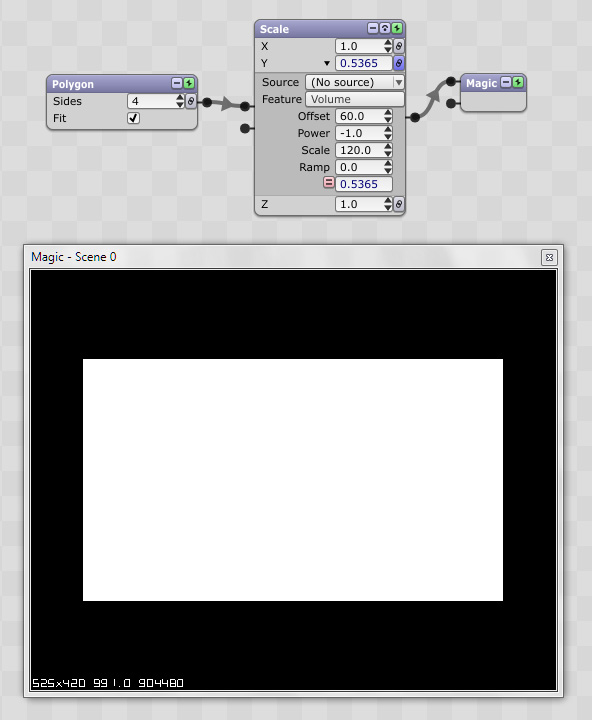
You can set an exact tempo with the Scale modifier (I put in 120 as an example). So in this case the module's Y parameter will ramp from 0 to 1 exactly 120 times per minute.
Regarding the math there, it's essentially this: (60 ^ -1) * 120 = 120/60 = 2. So 2 becomes the parameter value for the Ramp as I mentioned above. In other words, in this particular case, you could just put 2 as the Ramp's value and get rid of the other modifiers. But, if you have a bpm that doesn't divide so neatly (i.e., 113/60 = 1.88333333333), it's more convenient to just enter 113 as the Scale's value.
You could add even more modifiers to get other interesting results. For example, adding a Threshold modifier at the end with a .5 value would give you a blinking effect at the desired bpm.
Anyway, hopefully not too confusing but feel free to let me know.
Eric
Beat detection is tricky though, because it has the potential to do undesirable things. If I remember correctly, that's why we didn't put in in the software originally. It's not an exact science, and it could be bad if it detected something incorrectly during a live performance. Even if you manually tapped in a tempo, the tempo might change and things would go out of sync. Always hard to deal with these kinds of things during live performances.
One thing that might be helpful to know is that the Ramp modifier cycles exactly once per second when the value is 1 (= 60bpm), twice per second when the value is 2 (= 120bpm), and so on. So you could use it as an exact timing mechanism if you set the parameter source to "(No source)". I think this info is actually not in the User's Guide so maybe I should add it.
Even more helpful than that is you can do a little bit of magic (no pun intended) with modifiers to set an exact tempo. If you set up the modifiers like this:
You can set an exact tempo with the Scale modifier (I put in 120 as an example). So in this case the module's Y parameter will ramp from 0 to 1 exactly 120 times per minute.
Regarding the math there, it's essentially this: (60 ^ -1) * 120 = 120/60 = 2. So 2 becomes the parameter value for the Ramp as I mentioned above. In other words, in this particular case, you could just put 2 as the Ramp's value and get rid of the other modifiers. But, if you have a bpm that doesn't divide so neatly (i.e., 113/60 = 1.88333333333), it's more convenient to just enter 113 as the Scale's value.
You could add even more modifiers to get other interesting results. For example, adding a Threshold modifier at the end with a .5 value would give you a blinking effect at the desired bpm.
Anyway, hopefully not too confusing but feel free to let me know.
Eric
Re: BPM clock - automatic or manual
Thanks Eric. I do have been tinkering with the ramp or sine osc and threshold modifier. i for got about that while writing the OP though. during a live performance, incase of externally figuring out the bpm and then translating that into the ramp value, tapping it into magic which does the rest would be a big help. it could be helped by rounding up to 0.5 or 1.0 (as most electronic music uses bpm in 1 or 0.5 steps i assume). then also the video thing
so i guess the feature which i'm actually requesting is a ramp or sin osc modifier which uses bpm (which can be tapped or detected) as value which can however also be used as a speed input for the video node (and maybe others) (a certain amount of periods equal a certain velocity).
so i guess the feature which i'm actually requesting is a ramp or sin osc modifier which uses bpm (which can be tapped or detected) as value which can however also be used as a speed input for the video node (and maybe others) (a certain amount of periods equal a certain velocity).
Re: BPM clock - automatic or manual
Hmm, it seems like in the scenario you're describing, you wouldn't want the speed to change, right? You'd want it to be a constant value so the video playback is smooth. But a Ramp or a Sine would make the playback speed fluctuate -- it would go faster and then slower. Which could be a cool effect, but is that what you are after?
I think really what you want (unless I'm not understanding correctly) is a way to set the playback speed to a specific constant value so it matches the tempo of the music, and so the video loops exactly on a beat or two beats or whatever.
Yes? No?
I think really what you want (unless I'm not understanding correctly) is a way to set the playback speed to a specific constant value so it matches the tempo of the music, and so the video loops exactly on a beat or two beats or whatever.
Yes? No?
Re: BPM clock - automatic or manual
Yes. That the speed is defined on how quick 0 and 1 of a sine or ramp alternate but doesnt change then. Kinda like a motor where the 0 and 1 would represent the pistons up and down movement which propell a certain speed of the vehicle (so yes 0 and 1 wouldnt directly represent the speed, but would, constantly alternated, give a constant speed).
That way we'd be able to prerender rhytmic clips which speed we could adjust during live performance so that it matches the rhytm again. Doesnt necessarily have to be a sine ot ramp modifier, maybe there is a better solution.
Sorry if i worded what i want a bit clumsy before.
//edit: Just had an idea: maybe we could give magic the bpm of a rhytmic video (which one can figure out beforehand) and it then adusts its speed to match it to the bpm of the live performance which would either detected or manually entered (or for digital music: get the bpm from ableton via xy cable (no idea how. Via network cable?) ). Then all we'd need would be the option to offset the video playback as it will be at the same speed though probably always miss the beat. (An option to skim through playback during playback (eg via infinite midi knob) would be nice regardless of this thread )
That way we'd be able to prerender rhytmic clips which speed we could adjust during live performance so that it matches the rhytm again. Doesnt necessarily have to be a sine ot ramp modifier, maybe there is a better solution.
Sorry if i worded what i want a bit clumsy before
.//edit: Just had an idea: maybe we could give magic the bpm of a rhytmic video (which one can figure out beforehand) and it then adusts its speed to match it to the bpm of the live performance which would either detected or manually entered (or for digital music: get the bpm from ableton via xy cable (no idea how. Via network cable?) ). Then all we'd need would be the option to offset the video playback as it will be at the same speed though probably always miss the beat. (An option to skim through playback during playback (eg via infinite midi knob) would be nice regardless of this thread
)Re: BPM clock - automatic or manual (or resync clips to bpm)
If I'm understanding you correctly, you can already do what you suggested above. You have to do a little bit of math and you have to know the bpm of the audio and video as you mentioned. But if you do, then the formula to get the speed is simply: speed = bpm of audio / bpm of video. So, if the bpm of the audio is 126 and the video is 120, then the speed is 126/120 = 1.05. Setting the video's Speed parameter to 1.05 would therefore cause them to be synced.//edit: Just had an idea: maybe we could give magic the bpm of a rhytmic video (which one can figure out beforehand) and it then adusts its speed to match it to the bpm of the live performance which would either detected or manually entered (or for digital music: get the bpm from ableton via xy cable (no idea how. Via network cable?) ). Then all we'd need would be the option to offset the video playback as it will be at the same speed though probably always miss the beat. (An option to skim through playback during playback (eg via infinite midi knob) would be nice regardless of this thread
To change the offset of the playback you can use the Goto Start param, which will force it to rewind early. You could either do this by clicking the Goto Start button manually or by linking it to MIDI. If you do this right on a beat, it should stay synced fairly well. Let me know.
Re: BPM clock - automatic or manual (or resync clips to bpm)
Hmm, indeed your're right. In a live performance, aint got no time for math though  .
.
I used 'go to start' a lot, however it has its limits. As you described it could be used to sync whatever i'm playing to the beginning. however if a song is already playing and i missed the start of my video for it (as part of other elements), i cant just restart the song. in this scenario i imagine an option to offset playback during playback without going back to start really helpful.
In this case I adjust my feature requestments (I'm just stating them, you do implement what you think is right ) to these:
- ability to get the bpm from external sources (if available ) from either another program running locally, or another program running on another machine (eg. the ableton on my friends laptop which is connected via lan or midi or however this could work).
- ability to calculate the bpm approximately by either magically (pun intended) listening to the music and producing a bpm somehow, or by letting the user tap it via keyboard or midi device.
- using this bpm source to auto adjust the speed of a video with a user defined bpm, to the bpm of the live music.
- ability to freely offset video playback during playback by a userdefined step in seconds.
.I used 'go to start' a lot, however it has its limits. As you described it could be used to sync whatever i'm playing to the beginning. however if a song is already playing and i missed the start of my video for it (as part of other elements), i cant just restart the song. in this scenario i imagine an option to offset playback during playback without going back to start really helpful.
In this case I adjust my feature requestments (I'm just stating them, you do implement what you think is right
) to these:- ability to get the bpm from external sources (if available ) from either another program running locally, or another program running on another machine (eg. the ableton on my friends laptop which is connected via lan or midi or however this could work).
- ability to calculate the bpm approximately by either magically (pun intended) listening to the music and producing a bpm somehow, or by letting the user tap it via keyboard or midi device.
- using this bpm source to auto adjust the speed of a video with a user defined bpm, to the bpm of the live music.
- ability to freely offset video playback during playback by a userdefined step in seconds.
Re: BPM clock - automatic or manual (or resync clips to bpm)
Fair enoughHmm, indeed your're right. In a live performance, aint got no time for math though
.Good point. But, you can always temporarily change the Start Time to a later time and then use Go To Start to jump there. I know that isn't an ideal solution for live settings though.I used 'go to start' a lot, however it has its limits. As you described it could be used to sync whatever i'm playing to the beginning. however if a song is already playing and i missed the start of my video for it (as part of other elements), i cant just restart the song. in this scenario i imagine an option to offset playback during playback without going back to start really helpful.
We're looking into beat detection so hopefully we'll be able to make some improvements.
Wouldn't this be the same as temporarily increasing the Speed parameter?- ability to freely offset video playback during playback by a userdefined step in seconds.
Re: BPM clock - automatic or manual (or resync clips to bpm)
awesomeEric wrote:We're looking into beat detection so hopefully we'll be able to make some improvements.
No, as it plays all the frames just faster, while offsetting (i dont know if that's the right word for it, maybe you misunderstood me because of that) skips frames while keeping the speed. I actually used the speed parameter as a fast-forward before. not the same as instantly skipping one minute of film though. Also, no negative values are possible with the speed parameter.Eric wrote:Wouldn't this be the same as temporarily increasing the Speed parameter?blackdot wrote:- ability to freely offset video playback during playback by a userdefined step in seconds.
I'm off now to finally check the new features in 1.5
.Re: BPM clock - automatic or manual (or resync clips to bpm)
Ok so it sounds like it would be useful to have another parameter which lets you fast-forward or rewind a specified amount of time? I guess that's what you were saying here:No, as it plays all the frames just faster, while offsetting (i dont know if that's the right word for it, maybe you misunderstood me because of that) skips frames while keeping the speed. I actually used the speed parameter as a fast-forward before. not the same as instantly skipping one minute of film though. Also, no negative values are possible with the speed parameter.
Or, it might have to be two parameters -- one text parameter to specify the amount of time (positive or negative), and another trigger parameter to let you click (or use audio/MIDI) to execute the jump in that increment. How does that sound?- ability to freely offset video playback during playback by a userdefined step in seconds.
One thing to be aware of though -- jumping can be choppy due to the keyframe issue...
Re: BPM clock - automatic or manual (or resync clips to bpm)
That sounds awesome (the 2 param solution)!Eric wrote: How does that sound?
Re: BPM clock - automatic or manual (or resync clips to bpm)
http://wavesum.net/products.html#waveclock
I haven't tried it out myself yet but its the first thing I thought of when I saw this thread
I haven't tried it out myself yet but its the first thing I thought of when I saw this thread
Re: BPM clock - automatic or manual (or resync clips to bpm)
Oh yeah, I think I saw that a while ago, thanks. Maybe I'll try getting in touch with them.
Re: BPM clock - automatic or manual (or resync clips to bpm)
I actually tried out waveclock (the demo) before i stumbeled upon magic. Unfortunately it always crashed on my machine. I sent a mail twice to them, but got no response. So i kept looking and found magic .
.Re: BPM clock - automatic or manual (or resync clips to bpm)
Ok thanks. I've started to look around to see if any other beat detection utilities or algorithms are available that I can hook up fairly easily to Magic. If anyone has any recommendations please feel free to reply.
Re: BPM clock - automatic or manual (or resync clips to bpm)
Big fug has http://www.bigfug.com/software/audiobox/ although I haven't used this either.
Re: BPM clock - automatic or manual (or resync clips to bpm)
here's one http://www.midiclock.de/midiclock.php
hardware cost $275.00
Wavesum is great plus it takes audio and convert it to midi beat clock for sync visuals this works.
hardware cost $275.00
Wavesum is great plus it takes audio and convert it to midi beat clock for sync visuals this works.
-
Terry Payman
- Posts: 822
- Joined: Sun Sep 14, 2014 8:15 am
- Location: UK
- Contact:
Re: BPM clock - automatic or manual (or resync clips to bpm)
Perhaps all the following is implied/stated/requested above, but FWIW...
I envisage the following to be (optionally) scalable with a globally-set tempo BPM clock, probably with local reset on scene change.
1) Oscillators
2) GLSL speed inputs
3) Video frame rate for movies
4) Playlist scene duration
...
For example, a oscillating shader with its own arbitrary period could be trimmed with the GLSLShader module's Speed control to give one cycle per bar of the music, rather than just for a specific tempo. Likewise a rotating object could complete a fixed number of rotations per bar of music, rather than per second. IMHO this would greatly enhance the integration of a scene with the music if music tempo changes between tracks. My instinct is that there would need to be a local reset of time at scene-start, perhaps to a specified beat rather than just the start of the bar.
Have I mis-thought all this or does a simple BPM clock enable much more tempo-locked control of the system?
I know there are inherently frame-rate dependent effects, for example video feedback. I'm hoping that some scale factor on the speed or zoom of these can be incorporated, but can't think it through at the moment.
Tap-to-set would be the next step.
Any votes for starting soon with something much easier to implement, simply a manually-set ( & -reset?) BPM system clock as implied in the OP's subject?Eric wrote:... we are planning to have some kind of beat detection feature...Beat detection is tricky though...
If we have a global BPM clock, we can simultaneously adjust tempo for all modules in all scenes , rather than for just one module in one scene as I believe the above would do. Personally, with any cyclic or periodic scene, I love to have an integral number of cycles per bar of the music.Eric wrote:...the Ramp modifier cycles exactly once per second when the value is 1 (= 60bpm)...You can set an exact tempo with the Scale modifier
I envisage the following to be (optionally) scalable with a globally-set tempo BPM clock, probably with local reset on scene change.
1) Oscillators
2) GLSL speed inputs
3) Video frame rate for movies
4) Playlist scene duration
...
For example, a oscillating shader with its own arbitrary period could be trimmed with the GLSLShader module's Speed control to give one cycle per bar of the music, rather than just for a specific tempo. Likewise a rotating object could complete a fixed number of rotations per bar of music, rather than per second. IMHO this would greatly enhance the integration of a scene with the music if music tempo changes between tracks. My instinct is that there would need to be a local reset of time at scene-start, perhaps to a specified beat rather than just the start of the bar.
Have I mis-thought all this or does a simple BPM clock enable much more tempo-locked control of the system?
I know there are inherently frame-rate dependent effects, for example video feedback. I'm hoping that some scale factor on the speed or zoom of these can be incorporated, but can't think it through at the moment.
Tap-to-set would be the next step.
Re: BPM clock - automatic or manual (or resync clips to bpm)
Thanks Terry. Your post helped me realize it would be simple to add MIDI clock messages as a new source for module parameters. It would be similar to the Ramp modifier, but instead of being based on a time interval in seconds, it would use the BPM of the MIDI clock. It would pulse at every quarter note (as per the MIDI clock specification).
I think it would be a good quick-and-dirty starting point for BPM functionality. I'll try to get it into an upcoming release and we can see how everyone likes it. At first, an external MIDI clock source will be required (software or hardware). But we can move forward from there.
I think it would be a good quick-and-dirty starting point for BPM functionality. I'll try to get it into an upcoming release and we can see how everyone likes it. At first, an external MIDI clock source will be required (software or hardware). But we can move forward from there.
-
Terry Payman
- Posts: 822
- Joined: Sun Sep 14, 2014 8:15 am
- Location: UK
- Contact:
Re: BPM clock - automatic or manual (or resync clips to bpm)
Thanks Eric, that sounds like a useful facility, and I appreciate the elegance and simplicity of using MIDI clock.Eric wrote:... it would be simple to add MIDI clock messages as a new source for module parameters. It would be similar to the Ramp modifier, but instead of being based on a time interval in seconds, it would use the BPM of the MIDI clock...
However, I can't yet see how I would use that to change items 2, 3 & 4 in my list (GLSL speed inputs, video frame rate and playlist scene duration).
Would you need to phase-lock a higher rate clock to feed to GLSL & video frame rate control?Eric wrote:... It would pulse at every quarter note (as per the MIDI clock specification)...