Hey I think a great idea would be, add sticky notes with the abiltity to change between a couple of colors, that way we can put a few notes by modules to keep track of projects that get a little overwhelming. Just a thought, because I was gonna suggest different colored modules as well, but I can see thats already been said. I think sticky notes would be a nice addition for organizing scenes. IDK if you can do this in Quartz Composer but being able to minimize these notes to just a single header of a word or two would be ace.
Thanks for all your hard work Eric
UI suggestions
Re: UI suggestions
Ok thanks. You can also check out https://magicmusicvisuals.com/downloads ... uleOptions and scroll down a bit to the Annotations section. Let me know if it helps.
-
Fractal Grinder
- Posts: 109
- Joined: Tue Jun 23, 2015 7:42 pm
Re: UI suggestions
Yeah I'm sure that will help a ton. I'm currently working on a project that mainly is on one scene so things have gotten a little hairy, this will definately help me keep track of everything much better.Eric wrote: Let me know if it helps.
-
Fractal Grinder
- Posts: 109
- Joined: Tue Jun 23, 2015 7:42 pm
Re: UI suggestions
The only other thing I could say after using the Annotations is too have a option to make the note visable when the module is minimized. That would be perfect
-
Terry Payman
- Posts: 829
- Joined: Sun Sep 14, 2014 8:15 am
- Location: UK
- Contact:
Re: UI suggestions
I agree, and have already requested this. Eric suggested "Temporarily I suppose what you could do is put another module near your minimized module(s), such as DepthTest which has no params, but don't connect it anywhere… so its entire purpose would just be to show an annotation".SplatterBrainz wrote:The only other thing I could say after using the Annotations is too have a option to make the note visable when the module is minimized. That would be perfect
There are further comments too - follow this link for full details:
viewtopic.php?f=4&t=281&p=1011&hilit=+annotation#p1011
Re: UI suggestions
Some minor suggestions:
1) instead of audio 0 and audio 1 as the two audio channels, rename them 'left' and 'right'. So also e.g. microphone left / right, instead of microphone 0/1. Even if it's mono, or the left and right are swapped, it might look simpler (for a while I didn't understand why the audio inputs were duplicated!)
2) rename the vidCap module to vidCam. Again, video camera seems a more representative labelling than video capture (which makes me think of recording a video to a hard drive).
Bigger suggestion:
3) move some of the audio editing functions to the audio window. For example, in the 'audio editor' you would have together the volume select, frequency select, and also parameters such as gate, threshold etc. Critically would be to have a visible output of the audio (volume meter). Ideally then to have this editor for each input, so the user could set up multiple versions of the audio (e.g. one bass with a fast response, another for the high end, etc etc). The reason for this, is that at the moment if I want to fine tune the audio signal I have to do it in each module that takes that signal, so I'm often duplicating sets of parameters. Having the audio edited before it gets fed to the modules would keep it all in one place.
1) instead of audio 0 and audio 1 as the two audio channels, rename them 'left' and 'right'. So also e.g. microphone left / right, instead of microphone 0/1. Even if it's mono, or the left and right are swapped, it might look simpler (for a while I didn't understand why the audio inputs were duplicated!)
2) rename the vidCap module to vidCam. Again, video camera seems a more representative labelling than video capture (which makes me think of recording a video to a hard drive).
Bigger suggestion:
3) move some of the audio editing functions to the audio window. For example, in the 'audio editor' you would have together the volume select, frequency select, and also parameters such as gate, threshold etc. Critically would be to have a visible output of the audio (volume meter). Ideally then to have this editor for each input, so the user could set up multiple versions of the audio (e.g. one bass with a fast response, another for the high end, etc etc). The reason for this, is that at the moment if I want to fine tune the audio signal I have to do it in each module that takes that signal, so I'm often duplicating sets of parameters. Having the audio edited before it gets fed to the modules would keep it all in one place.
Re: UI suggestions
The main reason for the numbering is that many users have professional audio cards which have more than two inputs. Like this:1) instead of audio 0 and audio 1 as the two audio channels, rename them 'left' and 'right'. So also e.g. microphone left / right, instead of microphone 0/1. Even if it's mono, or the left and right are swapped, it might look simpler (for a while I didn't understand why the audio inputs were duplicated!)
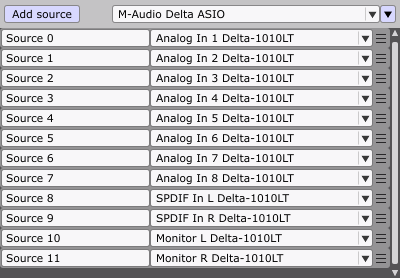
In this case, "left" and "right" wouldn't really make sense, because there are 8 analog inputs. So what would the remaining 6 be called
 ? Originally when I designed Magic several years ago, one of the main concepts was to allow users to create visuals that respond differently to many simultaneous live audio/MIDI instruments, or many simultaneous audio tracks.
Keep in mind that if the default naming is confusing, you can always rename the inputs:

Fair point. I've actually thought about renaming it, since it was originally intended only for web cams, and some people do get upset when their fancier capture devices don't work. The only reason I haven't changed it is so that people don't get confused. But I may change it in the future.2) rename the vidCap module to vidCam. Again, video camera seems a more representative labelling than video capture (which makes me think of recording a video to a hard drive).
This will actually be addressed in Magic 1.73) move some of the audio editing functions to the audio window. For example, in the 'audio editor' you would have together the volume select, frequency select, and also parameters such as gate, threshold etc. Critically would be to have a visible output of the audio (volume meter). Ideally then to have this editor for each input, so the user could set up multiple versions of the audio (e.g. one bass with a fast response, another for the high end, etc etc). The reason for this, is that at the moment if I want to fine tune the audio signal I have to do it in each module that takes that signal, so I'm often duplicating sets of parameters. Having the audio edited before it gets fed to the modules would keep it all in one place.
. There will be a separate window where you can define and customize global inputs, including choosing an audio/MIDI source and adding modifiers. This input can then be a source for any module parameter, and any adjustment you make to it will be automatically reflected everywhere it's used. Know what I mean?Re: UI suggestions
Okay I didn't even consider the multiple soundcard inputs; I often forget the luxury some people have
Regarding the other stuff it sounds like you've got it all under wraps
Regarding the other stuff it sounds like you've got it all under wraps
-
Fractal Grinder
- Posts: 109
- Joined: Tue Jun 23, 2015 7:42 pm
Re: UI suggestions
I figured this was the best place to post this, instead of making a new thread, but im working right now and I got a complex scene going on, thought that it would be really nice when you grab to move a module if you could make it so the connectors got highlighted or turned another color, at least while you move the module.. honestly not a big thing for me because I can see it fine if i move it a bit, but i think it would be a nice touch.
Re: UI suggestions
Sure that's a reasonable suggestion .
.