Page 1 of 2
BlackSpout feedback
Posted: Wed Nov 05, 2014 6:24 pm
by Magic
Hi everyone, I'm starting this topic as the "official" place for comments about BlackSpout. BlackSpout is a standalone Windows utility I developed which lets you capture input from any
Blackmagic device and transfer it in real-time to any application with Spout Receiver capability (Magic or otherwise). To maximize efficiency, BlackSpout uses the GPU as much as possible.
My inspiration for this project was the Black Syphon utility (
http://vdmx.vidvox.net/blog/black-syphon), which has the equivalent functionality for OS X.
News, announcements, and download links for BlackSpout are in this topic:
http://magicmusicvisuals.com/forums/vie ... ?f=6&t=201
Thanks, and I look forward to hearing your comments.
Eric
Re: BlackSpout feedback
Posted: Mon Nov 17, 2014 10:31 pm
by j4s0n
Mixed results on different computers.
BlackMagic Intensity Shuttle USB3
Magic ver. 1.51 on both systems.
Desktop: Works great, near real-time performance from HDMI input @ 720P
Win7 Pro x64
AMD 1090T 6 Core @ 3.5 GHz
8gb 1600MHz RAM
nVidia GTX 750 1gb - Driver ver. 335.23
BlackMagic Driver: 10.1
Laptop: Works, but serious lag, seems to get worse over time. No lag if not using BlackSpout (Intensity Shuttle source directly in Resolume)
Win7 Pro x64
Intel 3rd Gen i7 Quad Core @ 2.5 GHz
24gb 1600 MHz RAM
nVidia GTX 660M 2gb - Driver ver. 344.60
BlackMagic Driver: 10.1.1
Re: BlackSpout feedback
Posted: Mon Nov 17, 2014 11:25 pm
by Magic
What version of BlackSpout are you using? (It's at the bottom of the README.txt file.)
I did make a small improvement with lag. Try the newest version (0.11) and let me know if it works any better.
Re: BlackSpout feedback
Posted: Wed Aug 26, 2015 12:02 pm
by Reigel
Hi,
I desperately try to get live input from my Blackmagic Intensity Pro 4k.
I want to bring in the output screen of another computer via HDMI. This works in Resolume. But I would like to do it in Magic.
So I start Black Spout, the card is recognized correctly, I specify #1 (HDMI) and set mode to 9 (1080i60) which is the mode where Blackmagic Media Express shows me the input. Then Black Spout window opens but is entirely white.
Within Magic I can choose Media/VidCap. In the module there is only one choice: Blackmagic WDM capture. But no picture at all. Magic window stays black.
Where am I wrong? What can I do?
I already tried all other modes with no success.
Some info on my system: Win 8.1., Intel i7 4770 on ASUS Z87 PLUS, 16 GB RAM, NVIDIA GTX 970
Magic Window is set to 1920 x 1080
Best
Reinhard
Re: BlackSpout feedback
Posted: Wed Aug 26, 2015 4:17 pm
by Magic
Hi Reinhard, sorry about those troubles. Have you tried a progressive (non-interlaced) input resolution with BlackSpout? Such as 720p or 1080p? Those might work better. I don't have a BlackMagic card at the moment and I can't remember if I implemented support for interlaced resolutions like 1080i.
Re: BlackSpout feedback
Posted: Wed Aug 26, 2015 4:32 pm
by Reigel
Hi Eric,
thanks for answering.
And yes, I tried all possible resolutions incl. lower ones progressive and interlaced.
The Blackmagic card only responds to my other computers HDMI output in 1080i60.
But as said: This works with Resolume.
Maybe I should try some tweaks on that senders graphic resolutions? I did not dare to do so since I received a picture with MediaExpress.
Hope to find a way and any help ist much appreciated.
Best
Reinhard
Re: BlackSpout feedback
Posted: Thu Aug 27, 2015 3:49 pm
by Magic
If you are using the HDMI output from the graphics card of another computer, try setting that computer's desktop resolution to 1280x720. Then select 720p with BlackSpout. This is exactly how I tested it on my computer, and it seemed to work well. Let me know.
Re: BlackSpout feedback
Posted: Fri Aug 28, 2015 8:23 am
by Reigel
Hi,
I now tried with different resolutions, also 720p. No luck. I can see BlackSpout in Media but screen stays black.
Best
Reinhard
Re: BlackSpout feedback
Posted: Fri Aug 28, 2015 5:52 pm
by Magic
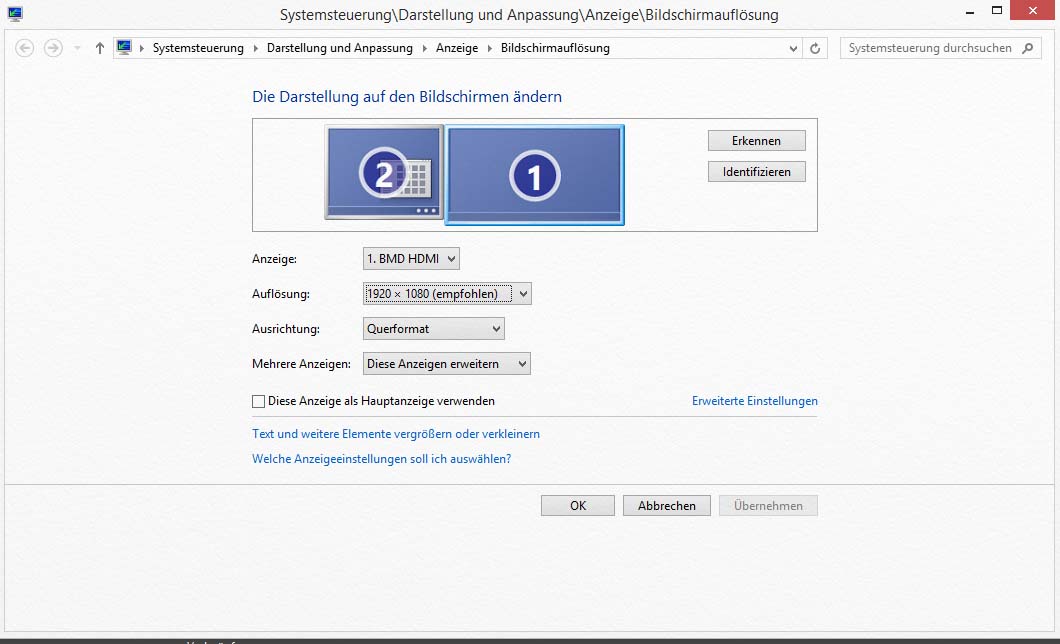
So you are plugging the HDMI cable directly into the output of your computer's graphics card, right? Can you right-click on the Desktop, select Screen resolution, and show me a screenshot?
Also, is your capture machine (the one you are using to run BlackSpout) a laptop or a desktop? And does it have integrated Intel graphics in addition to the Nvidia graphics?
Re: BlackSpout feedback
Posted: Fri Aug 28, 2015 8:06 pm
by Reigel
OK. Here we are.
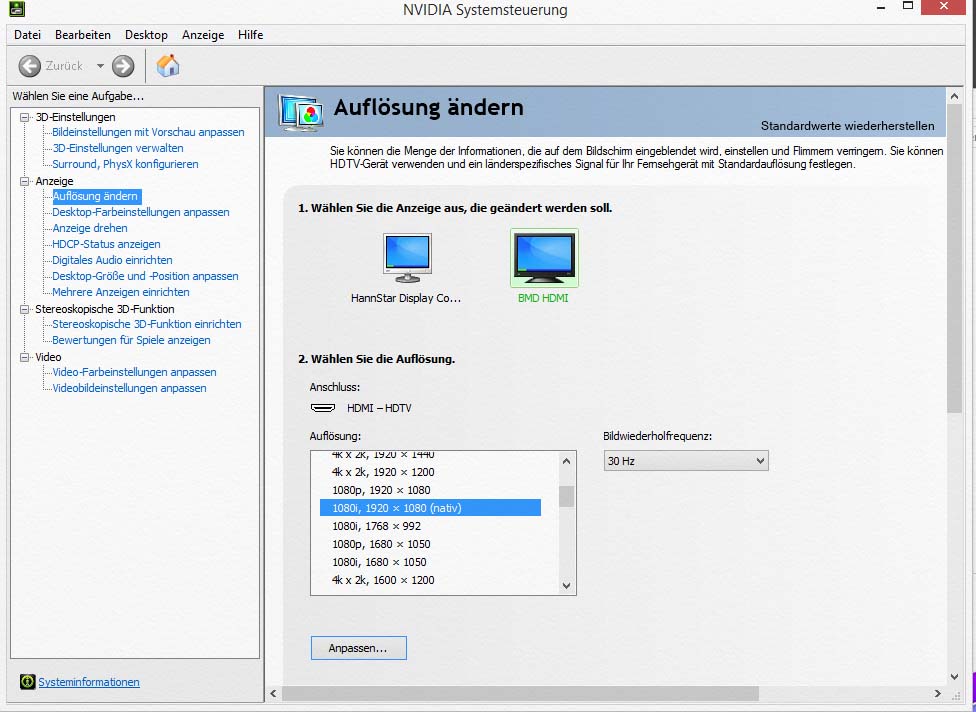
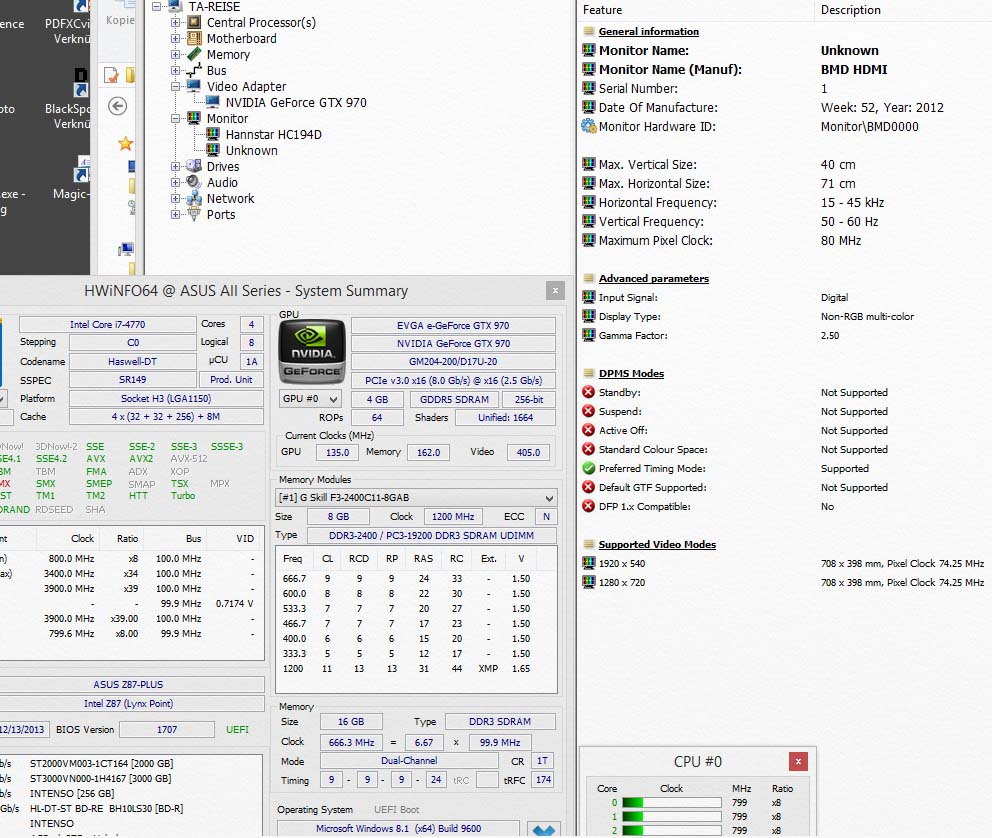
I post 3 screenshots: One is the regular windows screenresoltion window. The second is NVidia control center. Third one is HWInfo to show a summary of the computer and details of the card.
I could provide a HWInfo of the receiver also. Should I?
You see that windows shows just 1920 x 1080 as native resolution, NVidia says 1080p30 native resolution.
BlackMagic Desktop Video Utility recognizes incoming video as 1080i60 and so does rsolume and shows the video.
Both machines are desktops as You can see in the HWInfo shots. Integrated Intel graphics is off on both machines. HWInfo does not show an option to select the graphics.
So I hope You can see something.
BTW: I already switched machines. No difference.
Thanks and good luck.
Reinhard
- Screensholt_Sender.jpg (79.12 KiB) Viewed 65075 times
- Screensholt_Sender_NVidia.jpg (105.89 KiB) Viewed 65075 times
- HWInfo.jpg (171.9 KiB) Viewed 65075 times
Re: BlackSpout feedback
Posted: Fri Aug 28, 2015 8:28 pm
by Magic
Ok thanks that helps. And did you try setting the BMD HDMI output to a progressive resolution (720p or 1080p)? As I mentioned before, I don't think 1080i will work.
Re: BlackSpout feedback
Posted: Sat Aug 29, 2015 9:24 am
by Reigel
Yes, I tried (nearly) all possible resolutions. 1080p60 as well as 720p60 connects and I can see it in BMD Desktop Video Utility and in Resolume. But BlackSpout window shows a white screen and Magic VidCap shows the device but no picture.
Best
Reinhard
Re: BlackSpout feedback
Posted: Sat Aug 29, 2015 4:26 pm
by Magic
Ok, thanks. Unfortunately I'm not sure exactly what's going on. I'll have to think about it a bit and see if I can come up with anything.
Re: BlackSpout feedback
Posted: Sun Sep 27, 2015 9:21 am
by puck
Hi There,
Love the potential of this! However having the similar issues as above ...
after running BS and choicing input/res etc ... black spout will open and close
instantly or load to just a white screen ...
I'm running the latest version of spout v2.02 i think ...
using BM intensity shuttle usb and also have tried the thunderbolt version ...
widows 8 pro 64
have tried with touch designer and premiere pro ...
thanks!
puck.
Re: BlackSpout feedback
Posted: Sun Sep 27, 2015 6:31 pm
by Magic
Hmm, sorry about that. Where are you getting your input signal from? What format is it in?
Re: BlackSpout feedback
Posted: Wed Nov 09, 2016 1:08 pm
by Dannington
Hi, i'd love to use Blackspout for some realtime texture replacement. Unfortunately i'm having the same problem as the previous poster - white screen only using BlackSpout.exe in any mode. I'm using a BM IntensityPro 4k as a source using the latest drivers (Desktop Video 10.8.2 / Windows 10).
Could it be that I need an older driver perhaps? Do you know which version you're using?
If you see this post i'd be eternally grateful for any help!
Dan
Re: BlackSpout feedback
Posted: Wed Nov 09, 2016 4:32 pm
by Magic
Unfortunately I'm dependent on
BlackMagic to send me specific demo units to test with -- I don't have any right now. I'll see what I can do, but I can't make any guarantees.

Re: BlackSpout feedback
Posted: Sun Dec 31, 2017 1:09 am
by guishade
hello, this interface is super usefull but having some trouble, (white screen) was working a few months ago, is posible to have the source of this? thanks
Re: BlackSpout feedback
Posted: Tue Jan 02, 2018 5:02 pm
by Magic
Have you tried using the VideoCaptureDS module in Magic? It works with most BlackMagic cards, and then you can use Spout to send it somewhere else.
Re: BlackSpout feedback
Posted: Thu Jan 04, 2018 9:33 am
by Slavi
Hi,
I am yet to test it, but I just wated to say:
THANK YOU ERIC !!!!!
Or should I say EPIC

.
From the post above, I see that there are some things to be improved, but the fact you put the effort on making such software speacks greatly about Magic in general! As a person who had extreem strugges with making such thing happen on Windows, I am beyond gratefull for your work.
Thank you once again!!!